
Your ports have squatters.Kick them out.
Kickoutchi is a TUI and CLI port janitor. See which process owns a local port, read its family, and clear the stale dev server without guessing.
curl --proto '=https' --tlsv1.2 -LsSf https://kickoutchi.com/install.sh | shpowershell -ExecutionPolicy Bypass -NoProfile -Command "irm https://kickoutchi.com/install.ps1 | iex"Then run kick to open the TUI.Homebrew, Scoop, AUR, Nix, Cargo →
Demo device: node is squatting on port 3000. Use Scan, Inspect, or Kick.
It's a toy. Press scan, inspect, or kick. Your machine stays untouched.
The TUI
Meet your port janitor.
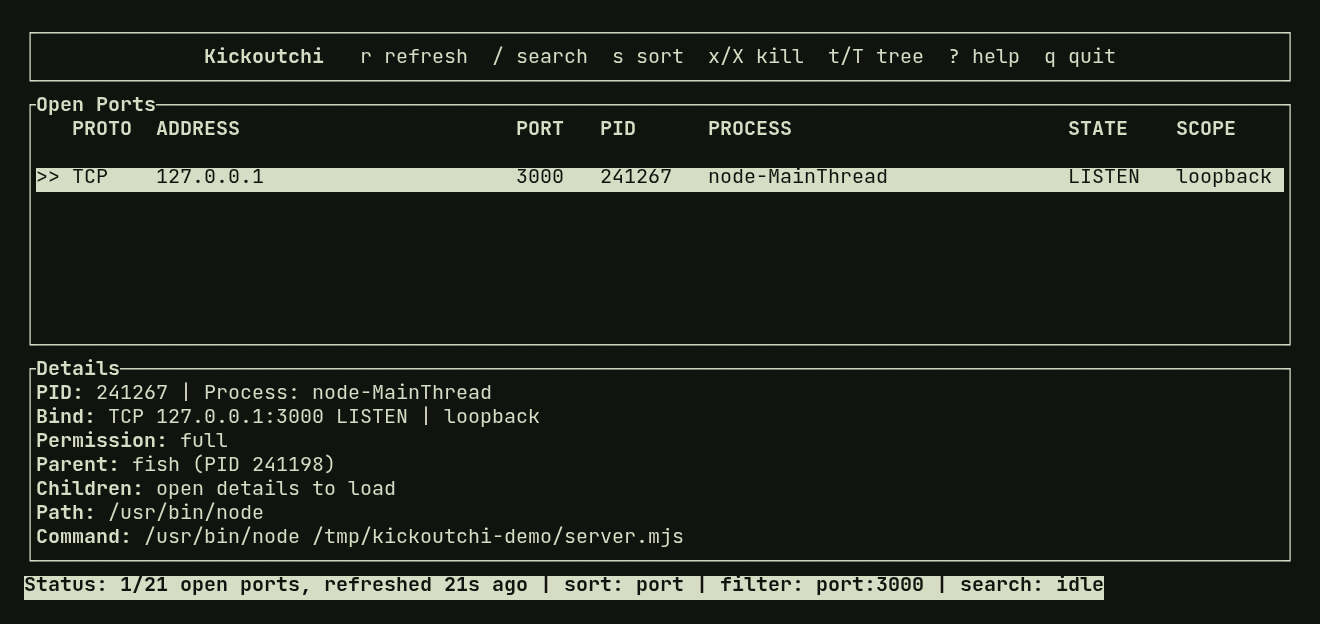
Run kick with no arguments. Every open port, its owner, and the details of whatever you select. Browsing never stops anything.
- ↵Details
- xTerminate
- XForce kill
- tKill tree
- /Search
- mFull report
- ?Help
- qQuit
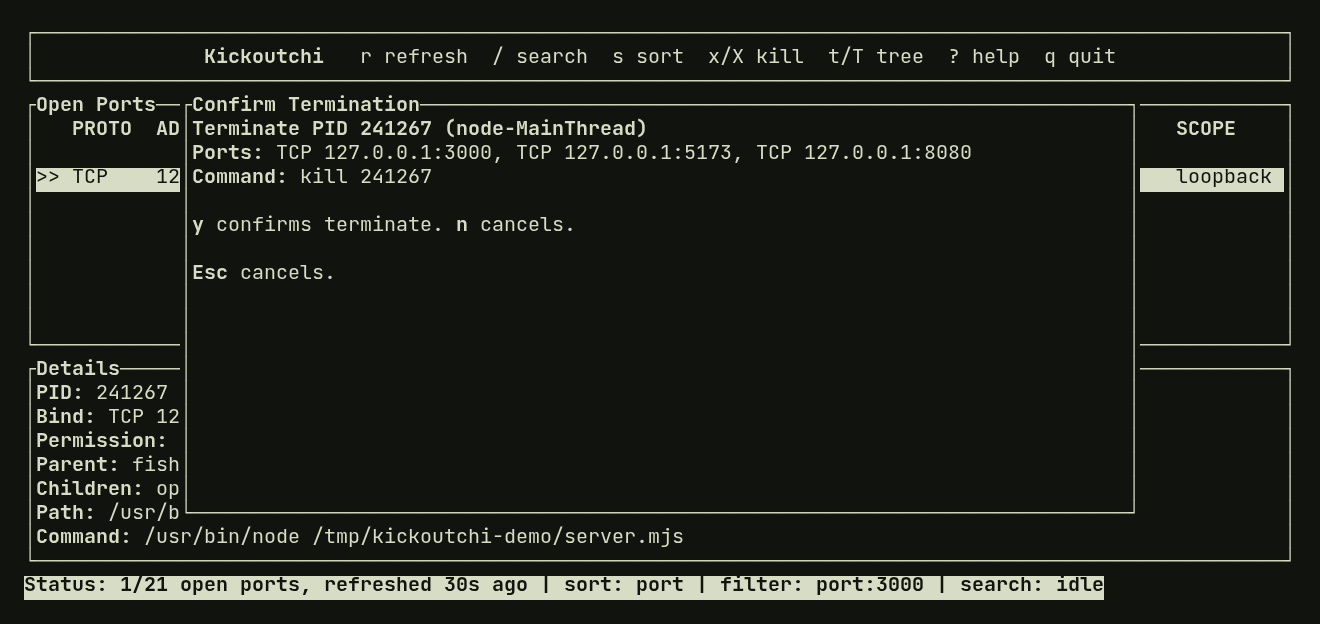
See the confirmation step
The prompt names the process and every affected port. Warnings wrap in full, and nothing stops until you confirm.
The CLI
Get straight to it.
Already know the port? Five verbs cover the job. Every transcript below uses the real output format.
Find the owner
Port 3000 is busy. See the process behind it before you decide anything. Add --json for scripts.
kick list --port 3000$ kick list --port 3000PROTO ADDRESS PORT PID PROCESS STATETCP 127.0.0.1 3000 18422 node LISTENRead the family
Dev servers leave workers behind. Inspect shows the tree, the group, and the exact command to clear it. Read-only.
kick inspect --port 3000$ kick inspect --port 3000Target: PID 18422 (node) Command: node server.mjs Ports: TCP 127.0.0.1:3000 … ancestors and siblingsTree (3 processes): PID 18422 (node) [TCP 127.0.0.1:3000] PID 18431 (vite) PID 18444 (esbuild)To terminate this tree: kick kill --pid 18422 --treeExplain the conflict
Got "address already in use"? Why probes the bind and returns the evidence, even when the owner is unclear.
kick why 3000$ kick why 3000tcp://127.0.0.1:3000 verdict=owned certainty=proven probe=address_in_use message=Address already in use (os error 98) evidence code=visible_verified_owner source=linux_procfs message=PID 18422 (node) owned the endpoint at snapshot capturetcp://[::1]:3000 verdict=bindable_now certainty=proven … fields trimmedWatch it change
One line per change as servers bind, release, or get replaced. Pipe it anywhere.
kick watch --port 5173$ kick watch --port 5173BIND TCP 127.0.0.1:5173 listen owners=21077 filter=matched certainty=provenRELEASE TCP 127.0.0.1:5173 listen owners=21077 filter=matched certainty=proven … observed timestamps trimmedKick it out
One process or a whole batch, confirmed by you, checked again right before the signal, then checked for a real exit.
kick kill --pid 18422$ kick kill --pid 18422Terminate PID 18422 (node)Scope: processPorts: TCP 127.0.0.1:3000Command: kill 18422Type y to confirm, or press Enter to cancel: ysent SIGTERM to PID 18422 (node)PID 18422 (node) exitedconfirmed target ports are no longer visibleSafety
Clear the right process.
A PID can be reused and a port can change hands between two keystrokes. Every kick walks the same path, and it stops the moment the target is no longer the one you confirmed.
Find
One snapshot ties every socket to its owner.
Inspect
Read the tree and group. Nothing is stopped.
Confirm
Type y, tree, force, or a protected PID.
Re-check
Identity, ports, and protection are read again.
Signal
SIGTERM by default. Any drift and it refuses.
One process by default. Trees and groups only when you ask.
Protected processes need the PID or name typed. --yes can't skip it.
Changed or uncertain targets are refused, never guessed.
Everywhere
Runs in every swamp.
Native collection on Linux, macOS, and Windows. No daemon to run. Two binaries ship together: kickoutchi and the short kick.
Linux
Native /proc collection with pidfd-backed tree/group kill and inspect.
macOS
Native libproc / sysctl collection with tree/group kill and inspect.
Windows
Native IP Helper listing, inspect, single-process kill, and CLI tree kill via Job Objects.
- HomebrewmacOS, Linux
brew install nuggocto/tap/kickoutchi - ScoopWindows
scoop bucket add nuggocto https://github.com/nuggocto/scoop-bucket scoop install kickoutchi - AURArch
yay -S kickoutchi-bin - NixLinux
nix run github:nuggocto/kickoutchi - CargoAnywhere Rust runs
cargo install --locked --git https://github.com/nuggocto/kickoutchi
Clear the swamp.
Your next dev server deserves a free port. Free and open source under MIT.
View the source on GitHub ↗